RISMedia
  • News
  • Premier
  • Reports
  • Events
  • Power Broker
  • Newsmakers
  • More
    • Publications
    • Education
No Result
View All Result
  • Agents
  • Brokers
  • Teams
  • Marketing
  • Coaching
  • Technology
  • More
    • Headliners New
    • Luxury
    • Best Practices
    • Consumer
    • National
    • Our Editors
Join Premier
Sign In
RISMedia
  • News
  • Premier
  • Reports
  • Events
  • Power Broker
  • Newsmakers
  • More
    • Publications
    • Education
No Result
View All Result
RISMedia
No Result
View All Result

How many ads can I upload for a Reservation

Home Ad Management
May 7, 2018
Reading Time: 2 mins read

A Reservation is divided by months. For example, Ed’s Real Estate signed a contract for Content Square Ad from June 1st to 2018 to Dec 31st 2018  for 40,000 Impressions. The system will automatically create a reservation with the details. The user/client will be notified via email (before 21,14 and 7 days the ad goes live) with a link. When you click on the link, the screen will show you your upcoming ads with links to upload your images for the ads. You don’t have to calculate the impressions, the system will automatically calculate the impressions depending on the no of days in the month. and the start date. If you want to modify the impressions for any particular month/ad you need to contact the Cindi Gallucci, Director, Client Relations & Event Management. You can upload single Ad for the whole reservation or you can upload separate ads for each month. You can upload upto 5 images for a single Ad.
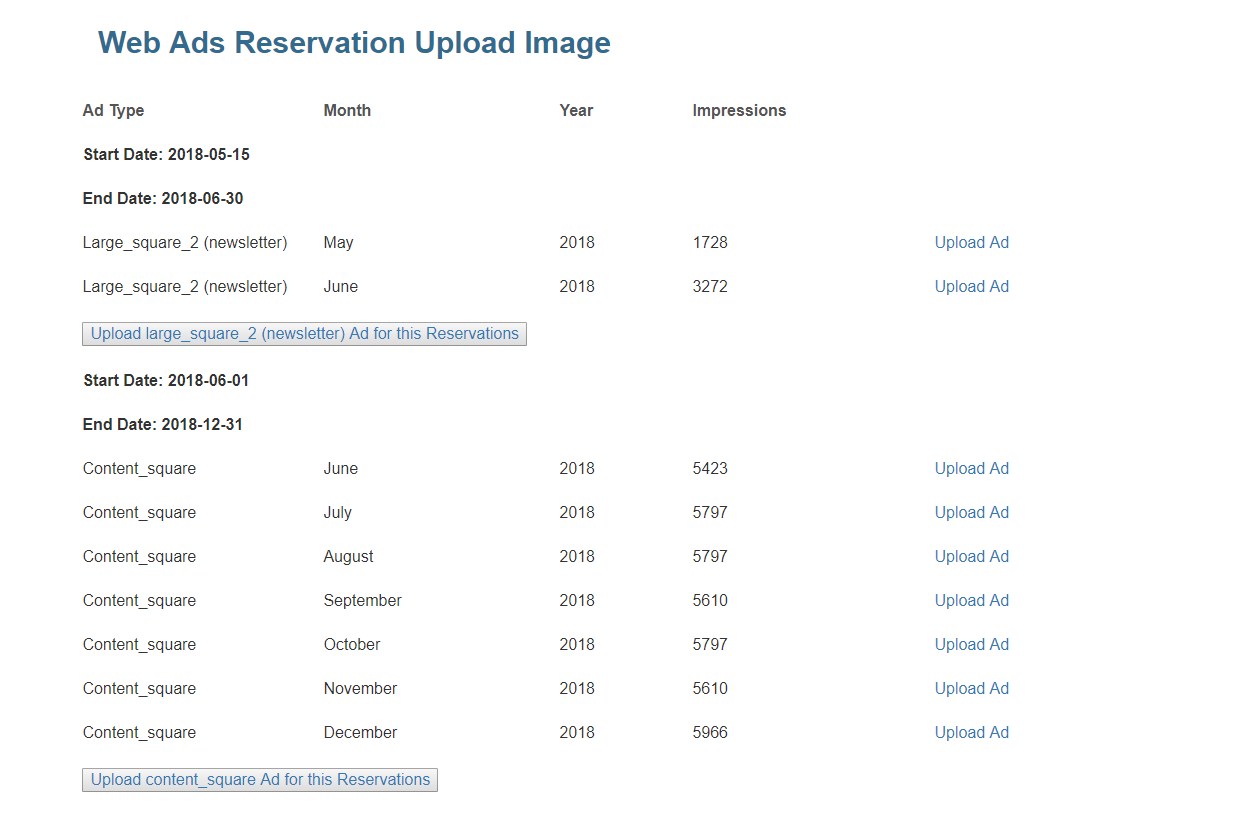
ad-screen

Let’s say you want to upload an image for the Month of June for the Content Square Ad for the above reservation. You have to click on the “Upload Ad” link at the month of June for the Content Square. Then the following screen will appear. Here you can add multiple images upto 5 by clicking the “Upload Another Ad” Button. All the images will be taken once and if the image dimensions match the criteria, then all the iamges will be uploaded and will be waiting for the “Approval”. In the below screen you can even control the % of impressions for each image. If it’s only one image, the system will automatically allow 100% impressions to the image.
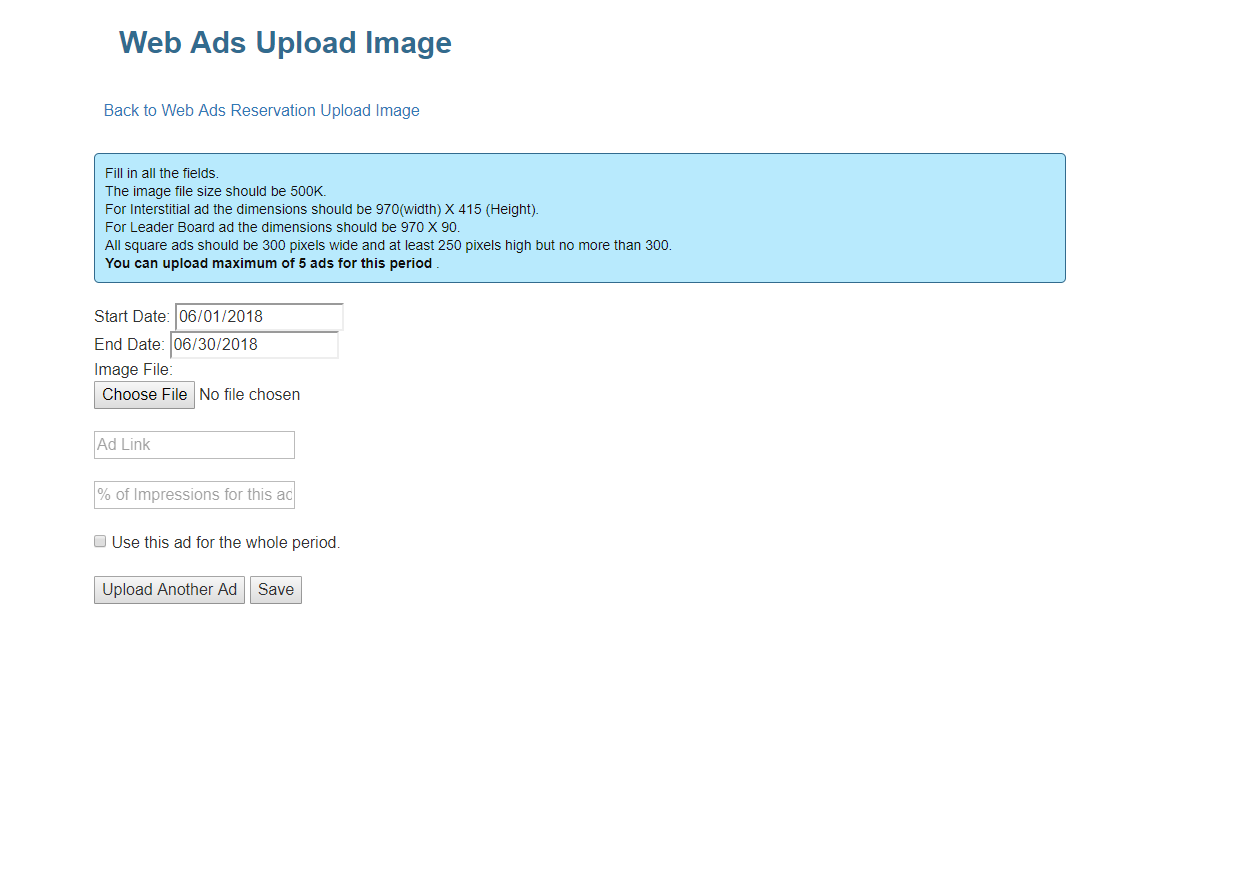
upload-ad-screen

ShareTweetShare
Hema Yemmireddy

Hema Yemmireddy

Related Posts

5 Tips to Help You Get Out of a Slump
Colibri

5 Tips to Help You Get Out of a Slump

August 10, 2020
Ad Management

What is a Reservation

May 7, 2018
Please login to join discussion
Tip of the Day

Top 4 ‘Don’t Bother’ Projects to Flag for Your Home Sellers

There’s a big difference in value between making improvements when planning to stay in a home versus prepping it for the market. Read more.

Business Tip of the Day provided by

Recent Posts

  • Federal Reserve Split on Appropriate Monetary Policy for 2026
  • Market Consolidation and the Pros and Cons for Agents
  • FHFA Shaves Affordable Housing Goals for Fannie and Freddie

Categories

  • Spotlights
  • Best Practices
  • Advice
  • Marketing
  • Technology
  • Social Media

The Most Important Real Estate News & Events

Click below to receive the latest real estate news and events directly to your inbox.

Sign Up
By signing up, you agree to our TOS and Privacy Policy.

About Blog Our Products Our Team Contact Advertise/Sponsor Media Kit Email Whitelist Terms & Policies ACE Marketing Technologies LLC

© 2025 RISMedia. All Rights Reserved. Design by Real Estate Webmasters.

No Result
View All Result
  • Home
  • Premier
  • Reports
  • News
    • Agents
    • Brokers
    • Teams
    • Consumer
    • Marketing
    • Coaching
    • Technology
    • Headliners New
    • Luxury
    • Best Practices
    • National
    • Our Editors
  • Publications
    • Real Estate Magazine
    • Past Issues
    • Custom Covers
  • Events
    • Upcoming Events
    • Podcasts
    • Event Coverage
  • Education
    • Get Licensed
    • REALTOR® Courses
    • Continuing Education
    • Luxury Designation
    • Real Estate Tools
  • Newsmakers
    • 2025 Newsmakers
    • 2024 Newsmakers
    • 2023 Newsmakers
    • 2022 Newsmakers
    • 2021 Newsmakers
    • 2020 Newsmakers
    • 2019 Newsmakers
  • Power Broker
    • 2025 Power Broker
    • 2024 Power Broker
    • 2023 Power Broker
    • 2022 Power Broker
    • 2021 Power Broker
    • 2020 Power Broker
    • 2019 Power Broker
  • Join Premier
  • Sign In

© 2025 RISMedia. All Rights Reserved. Design by Real Estate Webmasters.

X