
RISMedia
  • News
  • Premier
  • Reports
  • Events
  • Power Broker
  • Newsmakers
  • More
    • Publications
    • Education
No Result
View All Result
  • Agents
  • Brokers
  • Teams
  • Marketing
  • Coaching
  • Technology
  • More
    • Headliners New
    • Luxury
    • Best Practices
    • Consumer
    • National
    • Our Editors
Join Premier
Sign In
RISMedia
  • News
  • Premier
  • Reports
  • Events
  • Power Broker
  • Newsmakers
  • More
    • Publications
    • Education
No Result
View All Result
RISMedia
No Result
View All Result

Facebook Ads Made Easy – Part 2: Campaign Creation

Home Best Practices
By Patty McNease, Director of Marketing for Homes.com
February 6, 2017
Reading Time: 3 mins read
Facebook Ads Made Easy – Part 2: Campaign Creation

Astanbul, Turkey - April 16, 2012: Woman hands holding The New iPad displaying "Introducing New Facebook Pages" page on Facebook in a coffee shop. The third generation iPad is a touchscreen tablet pc produced by Apple Inc. The new iPad as known as iPad 3.

How many times has an advertisement caught your eye as you scrolled through post after post on Facebook or Instagram? You glanced at it for a few seconds, or—even better—you click through to their website to learn more about the company, product, or brand. Social-savvy companies know that advertising on Facebook is a great way to connect with new consumers to generate leads, and with Facebook offering a variety of targeted capabilities for its ad users, this is exactly the type of advertising strategy you need to implement in 2017.

In Part 2 of “Facebook Ads Made Easy,” we will focus on campaign creation along with a step-by-step guide on how to set up your first campaign. Before getting started, think about your campaign objective and the action you want your audience and new potential prospects to take after viewing your ad.

Setting Up Your Campaign
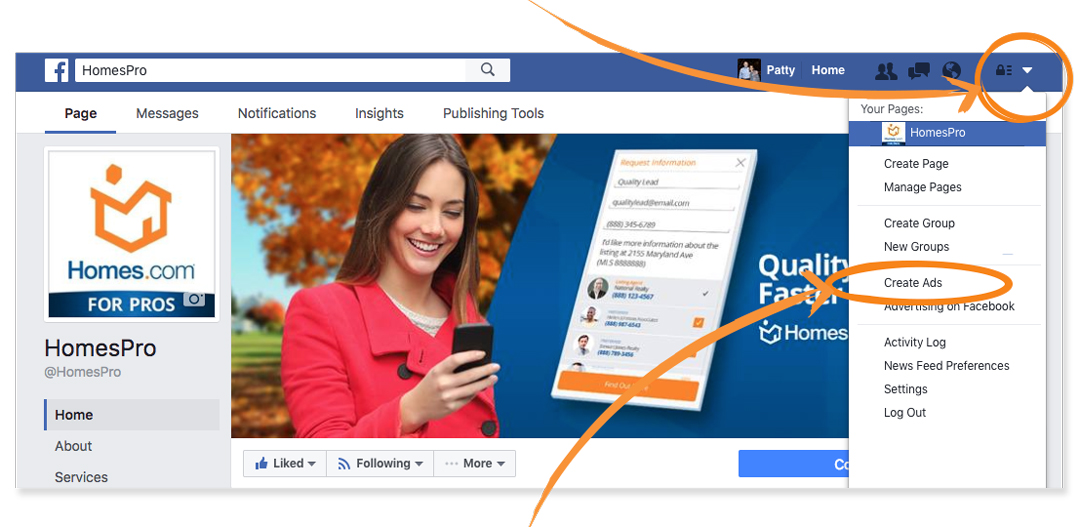
You’ve learned that in order to launch Facebook Ads, you need a Business Page (which we covered in Part 1 – Creating a Business Page). To set up a campaign, click on the dropdown menu resembling a downward arrow, then scroll down to the “Create Ads” option. This will take you to the “Ads Manager Tool” where you will create your Facebook Ad campaigns.
FB_Ads_2_1

Traffic Objective
Facebook offers over 13 different ad objectives you can choose from; for the purpose of keeping things simple, this example will focus on generating traffic for a specific listing.

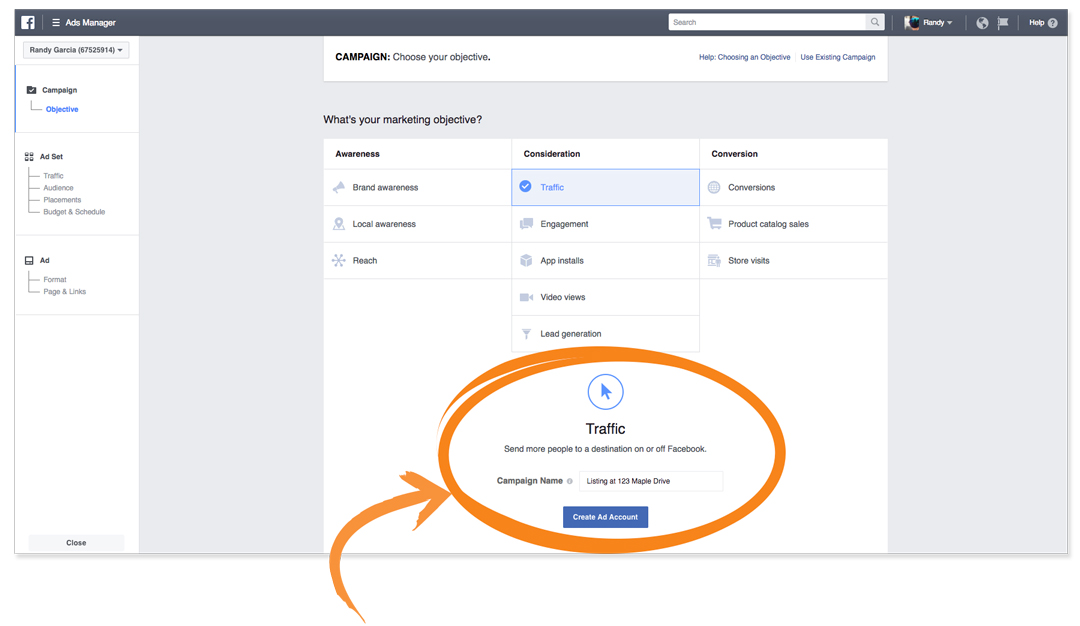
The goal of the traffic objective is to drive new visitors to your site. Make sure you’re sending traffic to a page with a lead capture form to convert the new visitors into leads. Below is how to create a traffic ad.

Clicking on the “Create Ads” dropdown (see above screenshot) will bring you to your “Ads Manager” page. Select the “Traffic” consideration, name your campaign, and click “Continue.”
FB_Ads_2_2

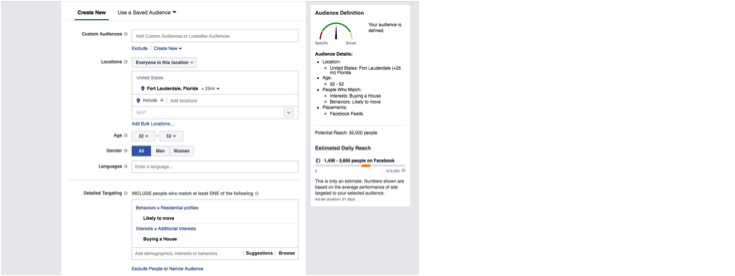
Clicking “Continue” will bring you to the page below. This is where you will create your audience, select your ad placement, add a budget, and set your schedule.
FB_Ads_2_3

This is where the fun begins: Facebook offers real estate agents diverse ad targeting capabilities to help you get the best results from your ads. Geo-specific targeting (such as targeting specific zip codes or areas near your listing) and targeting people based on their behavior (for example, targeting someone who is “likely to move”). In Part 3 of this series, we will show you how to create your “Audience, Placement, and Budget” in your Facebook Ads Manager.

If keeping up with your social strategy is too much for you, let us help! Homes.com Social Fuel takes care of your social strategy, providing you with everything from account setup, post creation, engagement, and Facebook Ad management. We will even manage your online reputation and monitor how your business ranks in search results so you can focus on selling real estate.

For more information, please visit connect.homes.com.

For the latest real estate news and trends, bookmark RISMedia.com.

Tags: Facebook AdsFacebook AdvertisingHomes.comInstagramReal Estate MarketingSocial Media Marketing
ShareTweetShare

Related Posts

NWMLS
Industry News

Breaking: NWMLS Signals Intention to Countersue Compass

December 5, 2025
Mortgage
Industry News

Mortgage Mix: Credit Reporting Fees Spark Pushback; MBA Urges Reverse Mortgage ‘Improvements’

December 5, 2025
The Life, Times, Triumphs and Tribulations of a Residential Real Estate Economist
Agents

The Life, Times, Triumphs and Tribulations of a Residential Real Estate Economist

December 5, 2025
Mortgage Industry Calls Foul on Latest Fee Hikes From FICO
Industry News

Mortgage Industry Calls Foul on Latest Fee Hikes From FICO

December 5, 2025
Consumer Sentiment Lifts Slightly in Early December
Industry News

Consumer Sentiment Lifts Slightly in Early December

December 5, 2025
Congressional Watchdog to Investigate FHFA Director Over Alleged Abuse of Power
Industry News

Congressional Watchdog to Investigate FHFA Director Over Alleged Abuse of Power

December 5, 2025
Please login to join discussion
Tip of the Day

Year-End Tune-Up: Streamline Your Real Estate Toolbox for 2026

Before the new year comes around, now is the time to step back and evaluate your tech stack, from your CRM and marketing automation tools to your showing schedulers and AI assistants. Read more.

Business Tip of the Day provided by

Recent Posts

  • Breaking: NWMLS Signals Intention to Countersue Compass
  • Mortgage Mix: Credit Reporting Fees Spark Pushback; MBA Urges Reverse Mortgage ‘Improvements’
  • The Life, Times, Triumphs and Tribulations of a Residential Real Estate Economist

Categories

  • Spotlights
  • Best Practices
  • Advice
  • Marketing
  • Technology
  • Social Media

The Most Important Real Estate News & Events

Click below to receive the latest real estate news and events directly to your inbox.

Sign Up
By signing up, you agree to our TOS and Privacy Policy.

About Blog Our Products Our Team Contact Advertise/Sponsor Media Kit Email Whitelist Terms & Policies ACE Marketing Technologies LLC

© 2025 RISMedia. All Rights Reserved. Design by Real Estate Webmasters.

No Result
View All Result
  • Home
  • Premier
  • Reports
  • News
    • Agents
    • Brokers
    • Teams
    • Consumer
    • Marketing
    • Coaching
    • Technology
    • Headliners New
    • Luxury
    • Best Practices
    • National
    • Our Editors
  • Publications
    • Real Estate Magazine
    • Past Issues
    • Custom Covers
  • Events
    • Upcoming Events
    • Podcasts
    • Event Coverage
  • Education
    • Get Licensed
    • REALTOR® Courses
    • Continuing Education
    • Luxury Designation
    • Real Estate Tools
  • Newsmakers
    • 2025 Newsmakers
    • 2024 Newsmakers
    • 2023 Newsmakers
    • 2022 Newsmakers
    • 2021 Newsmakers
    • 2020 Newsmakers
    • 2019 Newsmakers
  • Power Broker
    • 2025 Power Broker
    • 2024 Power Broker
    • 2023 Power Broker
    • 2022 Power Broker
    • 2021 Power Broker
    • 2020 Power Broker
    • 2019 Power Broker
  • Join Premier
  • Sign In

© 2025 RISMedia. All Rights Reserved. Design by Real Estate Webmasters.

X